Archive for the 'Data Integration (Kettle)' Category

Ordered Rows in Kettle

Wednesday, June 25th, 2008

There was a question posed the other day on the Pentaho forums about how to get Kettle to process “all the rows” at one step before beginning execution on the others. Sven suggested to use the “execute once for every row” as a solution which I think is probably overall, a cleaner way to accomplish a multistep process. However, it is possible to do this in Kettle now.

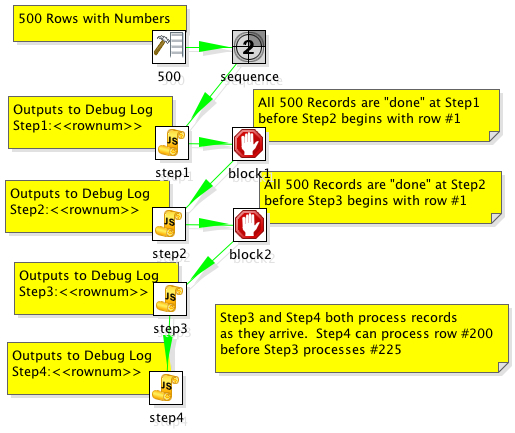
The solution is to add “Blocking Step”s in your transformation where you need the whole thing to have completed before continuing processing.

Consider the following example:

200806251534

The step “block1″ does not pass rows to Step2 until all rows have finished at Step1. This accomplishes the desired outcome of ensuring that all records have completed processing on step1 before step2 processes. The example transformation outputs to the debug log and it’s clear that they are output in the correct order.

2008/06/25 15:25:04 - step1.0 - Step1:1
2008/06/25 15:25:04 - step1.0 - Step1:2
2008/06/25 15:25:04 - step1.0 - Step1:3
2008/06/25 15:25:04 - step1.0 - Step1:4
2008/06/25 15:25:04 - step1.0 - Step1:5
...
2008/06/25 15:25:05 - step1.0 - Step1:499
2008/06/25 15:25:05 - step1.0 - Step1:500
...
2008/06/25 15:25:05 - step2.0 - Step2:1
2008/06/25 15:25:05 - step2.0 - Step2:2
2008/06/25 15:25:05 - step2.0 - Step2:3
2008/06/25 15:25:05 - step2.0 - Step2:4
2008/06/25 15:25:05 - step2.0 - Step2:5
...
2008/06/25 15:25:05 - step2.0 - Step2:499
2008/06/25 15:25:05 - step2.0 - Step2:500
...
2008/06/25 15:25:05 - step3.0 - Step3:1
2008/06/25 15:25:05 - step3.0 - Step3:2
2008/06/25 15:25:05 - step3.0 - Step3:3
2008/06/25 15:25:05 - step3.0 - Step3:4
2008/06/25 15:25:05 - step3.0 - Step3:5
2008/06/25 15:25:05 - step3.0 - Step3:6
2008/06/25 15:25:05 - step3.0 - Step3:7
2008/06/25 15:25:05 - step4.0 - Step4:1
2008/06/25 15:25:05 - step3.0 - Step3:8
2008/06/25 15:25:05 - step4.0 - Step4:2
2008/06/25 15:25:05 - step3.0 - Step3:9
2008/06/25 15:25:05 - step4.0 - Step4:3
2008/06/25 15:25:05 - step4.0 - Step4:4

Example here: ordered_rows_example.ktr

Using Kettle for EII

Wednesday, August 15th, 2007

Pentaho Data Integration (aka Kettle) can be used for ETL but it can also be used in EII scenarios. For instance, you have a report that can be run from a customer service application that will allow the customer service agent to see the current issues/calls up to the minute (CRM database) but also give a strategic snapshot of the customer from the customer profitability and value data mart (data warehouse). You’d like to look a this on the same report that with data coming from two different systems with different Operating Systems and databases.

Kettle can make short work of this using the integration Pentaho provides and the ability to SLURP data from an ETL transform into a report without the need to persist to some temporary or staging table. The thing that Pentaho has NOT made short work of, is being able to use the visual report authoring tools (Report Designer and Report Design Wizard) to be able to use a Kettle transform as a source for the report during design time. That’s an important point worth repeating.

As of Pentaho 1.6, Pentaho provides EII functionality at RUNTIME but NOT at DESIGNTIME.

So, you can use an ETL transform as the source of a report, and there two examples of that. In the samples/etl directory that ships in the Pentaho BI Suite demo or you can see another example in an earlier blog entitled “Simple Chart from CSV“.

What is the best method for building reports that are going to use this functionality?

I, like others who use the Pentaho product suite, would like to use the Report Designer to build my report visually but have the data actually coming from an EII transformation. This blog is about those steps.

Step 1. Create your data set

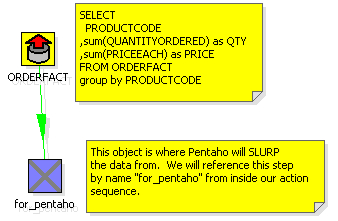
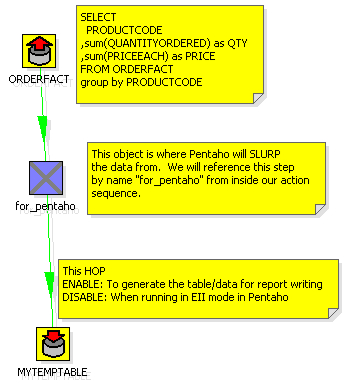
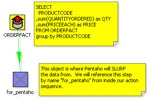
Build an ETL transformation that ends with the data you want to get on your report. Use several databases, lookups, calculations, excel files, whatever you want. Just get your data ready (use the Preview functionality in Kettle). You’d do this with Kettle 2.5.x if you want to deploy into Pentaho 1.6. I’ve created a simple ETL transformation that does something absurdly simple: generate summary sales figures by product.
200708151622
Step 2. Add a table output step to the transformation

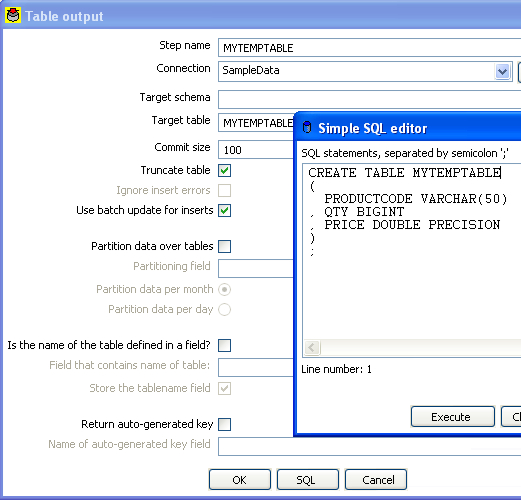
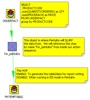
What we’re going to do now is create a table that we’ll use ONLY during design time to build our report. Just use any database that you have access to while designing the report (MySQL or Oracle XE on your local machine?). Add a table output step to the transformation and click on the “SQL” button to have it generate the DDL for the table. Go ahead and execute the DDL to create your temporary table that we’ll use for designing our report. Name the table something silly like MYTEMPTABLE.
200708151624
200708151627

Step 3. Execute the mapping and populate the temporary table

Hit run and get data into that table. Now we have a table, MYTEMPTABLE that has the format and a snapshot of data we want to use for building our report.

Step 4. Write your report using the temporary table as a source

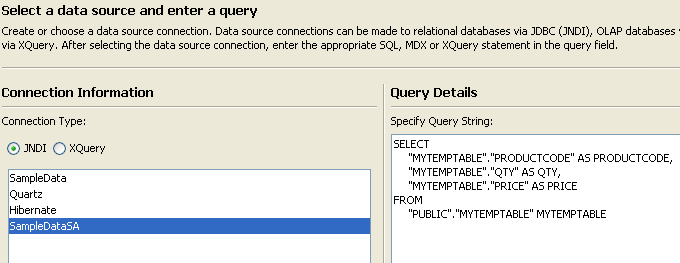
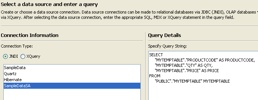
Open up Report Designer. Run through the wizard (or the Report Designer) as usual and build your report (with groupings, logos, images, totals, etc) just like you normally would. You will use the MYTEMPTABLE in your temporary database as your source for this report.
200708151631

Nothing spectacular yet. All we’ve done is write a basic report against a basic table.

Step 5. Publish your report to Pentaho server and test

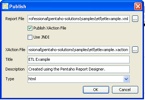
Using Publish (or Publish to Server) in the Pentaho Report Designer publish the report to the server so you can execute your report from the web using Pentaho. In this example I published the report to samples/etl so it’s alongside the example that we shipped with Pentaho demo server.
200708151634

Let’s make sure that report showed up.
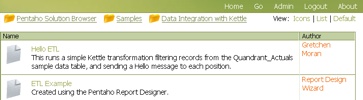
200708151635

Great. Let’s click on it to make sure the report runs.
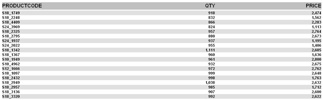
200708151636

Ok. Our report (etlexample.xaction) runs inside of Pentaho. Again, at this point we’ve not done anything spectacular this is just a basic (read Ugly basic grey/white) report that just selects data from MYTEMPTABLE.

Step 6. Copy transformation so it’s beside the report

It’s not REQUIRED but it’s a very good idea to DISABLE the hop from the for_pentaho step and the table output. When we run this report now we don’t actually want to do any INSERTS into a table. If we disable the hop after for_pentaho then the transformation does ZERO DML.

The ETL transformation can really be anywhere, but it’s good practice to put the transformation (.ktr file) alongside the report. Copy the kettleexample.ktr file (from Step 1) to samples/etl so that it is sitting alongside etlexample.xaction.

Step 7. Swap from Relational to Pentaho Data Integration.

You could make the change directly to the .xaction to get it to source data from the Kettle transform. However, I’m going to copy etlexample.xaction to etlexample2.xaction just so that I can see both running side by side.

In Design Studio, copy etlexample.xaction to a new action sequence etlexample2.xaction.

Open up etlexample2.xaction and make the following changes.

First, change the name of the action sequence from ETL Transformation to ETL Transformation - NO TABLE
200708151647

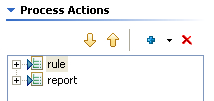
Second, remove the “relational” data that is producing the data for the report by highlighting the step named “rule” and then hitting the RED X to remove it.
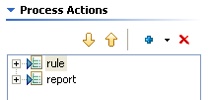
200708151649
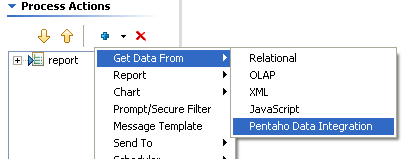
Third, add a Get Data From Pentaho Data Integration step ABOVE the report step.
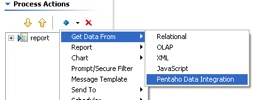
200708151651

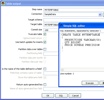
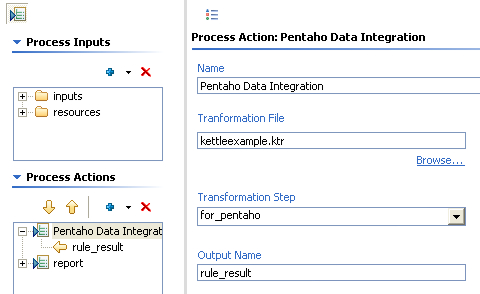
Fourth, configure the Pentaho Data Integration as follows.
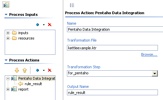
200708151650

Some notes about what we’ve just done there. We’ve told it the name of the Kettle transformation we’d like to use to get our data is kettleexample.ktr. There are two other important pieces of information we’ve filled in on that screen as well. We’ve told the component that we’ll get our data (rows) from the step named “for_pentaho.” The component will SLURP data from that step and stream it into the result. The other piece of information we’ve given to the component is what we want to name the result set so that the report knows where to get the results. Name the result set “rule_result.”

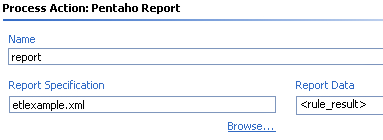
Finally, highlight the report step and make sure that the report is getting its data from “rule_result” but we shouldn’t have to change anything else about the report. Just where it was getting its data.
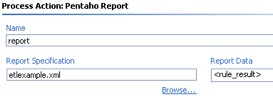
200708151658

Step 8. Test your EII version of your same report

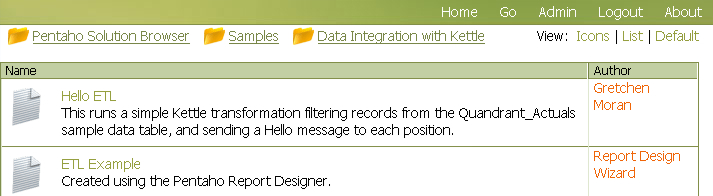
Navigate to find your new report you created that uses the Kettle ETL transformation INSTEAD of the table.
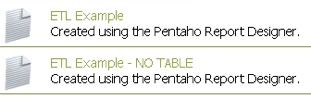
200708151658-1

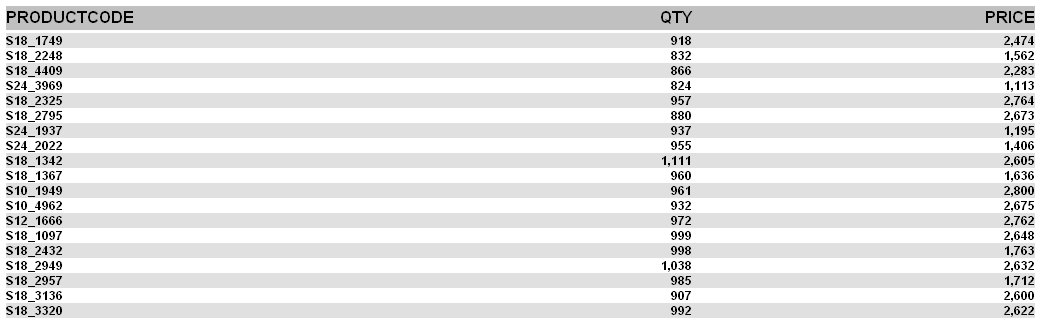
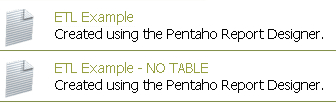
Click on ETL Example - NO TABLE and you should see the same data/report.
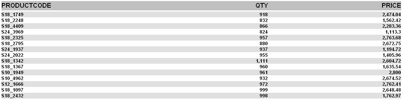
200708151659

This report is NOT using MYTEMPTABLE and is instead, peering inside of kettleexample.ktr and getting its data from “for_pentaho” and generating the report.

Congratulations! You now have a method that you can use to create EII reports using the same visual tools as when normally developing against a relational source. Imagine the possibilities…. what you can do in Kettle (pivot, unpivot, lookup, calculate, javascript, excel, flat file, web service, XML streaming, call database procedures, and on and on and on) you can do for your reports.

Feedback welcome. The zip file for this example here. I built this example on 1.2 Demo Server GA but should work on 1.6 as well. All you need to do is unzip the file above into pentaho-demo/pentaho-solutions/samples/etl and you should have another working example.
Kettles secret in-memory database

Wednesday, June 20th, 2007

Kettles secret in-memory database is

  1. Not actually secret
  2. Not actually Kettles

There. I said it, and I feel much better. :)
In most circumstances, Kettle is used in conjunction with a database. You are typically doing something with a database: INSERTs, UPDATEs, DELETEs, UPSERTs, DIMENSION UPDATEs, etc. While I do know of some people that are using Kettle without a database (think log munching and summarization) a database is something that a Kettle developer almost always has at their disposal.

Sometimes there isn’t a database. Sometimes you don’t want the slowdown of persistence in a database. Sometimes you just want Kettle to just have an in memory blackboard across transformations. Sometimes you want to ship an example to a customer using database operations but don’t want to fuss with database install, dump files, etc.

Kettle ships with a Hypersonic driver, and therefore, has the ability to create an in memory database that does (most) everything you need database wise.

For instance, I’ve created two sample transformations that use this in-memory database.

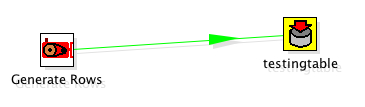
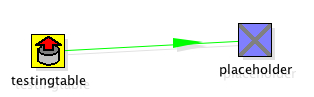
The first one, kettle_inprocess_database.ktr, loads data into a simple table:
200706202230

The second one, kettle_inprocess_database_read.ktr, reads the data back from that simple table:
200706202235

To setup the database used in both of these transformations, which has no files, and is only valid for the length of the JVM I’ve used the following Kettle database connection setup.

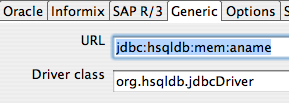
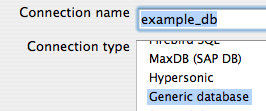
I setup a connection named example_db using the Generic option. This is so that I have full control over the JDBC URL.
200706202227

I then head to the Generic tab and input by URL and Driver. Nothing special with the driver class, org.hsqldb.jdbcDriver that is just the regular HSQLDB driver name. The URL is a little different then usual. The URL provided tells hypersonic to use a database in-memory with no persistence, and no data fil.e”
200706202225

Ok, that means the database “example_db” should be setup for the transformations.

Remember, there is NOTHING persistent about this database. That means, every time I start Kettle the database will have no tables, no rows, no nothing. Some steps to run through this example.

  1. Open kettle_inprocess_database. “Test” the example_db connection to ensure that I / you have setup the in-memory database correctly.
  2. Remember, nothing in the database so we have to create our table. In the testing table operator, hit the SQL Button at the bottom of the editor to generate the DDL for this smple table.
  3. Run kettle_inprocess_database and verify that it loaded 10 rows into testingtable.
  4. Run kettle_inprocess_database_read and verify that it is reading 10 rows from the in-memory table testingtable.

I should note that using this approach isn’t always a good idea. In particular there’s issues with memory management, thread safety, it definitely won’t work with Kettles clustering features. However, it’s a simple easy solution for some circumstances. Your mileage may vary but ENJOY!

Kettle ETL Jobs over the Internet

Monday, May 28th, 2007

Kettle recently switched over from accessing the file system via standard Java libraries to using the Apache VFS libraries. So what does that mean? Why does that matter? Well, it really opens up a whole slew of deployment options, and provides even more options for managing Kettle code. You can now manage your actual ETL jobs and transforms in Zipfiles, on Web Servers, FTP servers, WebDav locations, etc. Basically, you can making Kettle even thinner than it is right now.

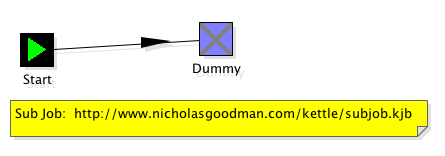
For instance, you can now run Kettle ETL jobs with ONLY the base Kettle installation and a remote URL. Consider the following example.
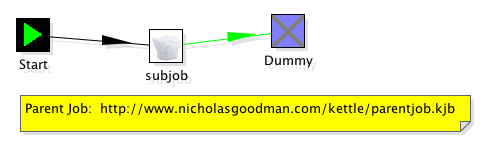
I have two Kettle jobs:

http://www.nicholasgoodman.com/kettle/parentjob.kjb
200705281727

-AND -

http://www.nicholasgoodman.com/kettle/subjob.kjb
200705281729

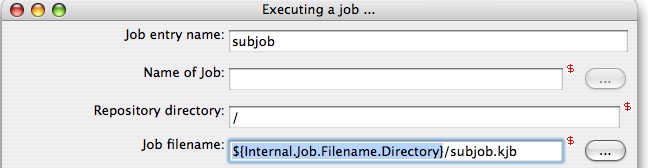
The parent job, does something very simple: It executes the subjob.kjb using relative addressing. You can use the well known and supported ${Internal.Job.Filename.Directory} variable so that you don’t have to hard code the physical location of another jobs/transform/datafile/etc. In this case, it doesn’t matter if the subjob is on the local file system or on a webserver. The dialog to setup the relative addressing looks like this:

200705281733

Now, using nothing but the standard Kettle 2.5.0 download I can execute these two jobs without any client side ETL Jobs or Transforms.

./kitchen.sh -file=http://www.nicholasgoodman.com/kettle/parentjob.kjb

17:42:30,075 INFO [Kitchen] Kitchen - Start of run.
17:42:30,644 INFO [Kettle] Kettle - Reading repositories XML file: /Users/ngoodman/.kettle/repositories.xml
17:42:30,647 ERROR [Kettle] Kettle - Error opening file: /Users/ngoodman/.kettle/repositories.xml : java.io.FileNotFoundException: /Users/ngoodman/.kettle/repositories.xml (No such file or directory)
ERROR: No repositories defined on this system.
2007/05/28 17:42:30:695 PDT [INFO] DefaultFileReplicator - Using “/tmp/vfs_cache” as temporary files store.
17:42:31,991 INFO [Thread[parentjob (parentjob (Thread-2)),5,main]] Thread[parentjob (parentjob (Thread-2)),5,main] - Sleeping: 0 minutes
17:42:31,992 INFO [parentjob] parentjob - Starting entry [subjob]
17:42:32,133 INFO [Thread[subjob (subjob (Thread-3)),5,main]] Thread[subjob (subjob (Thread-3)),5,main] - Sleeping: 0 minutes
17:42:32,134 INFO [subjob] subjob - Starting entry [Dummy]
17:42:32,135 INFO [subjob] subjob - Finished jobentry [Dummy] (result=true)
17:42:32,233 INFO [parentjob] parentjob - Starting entry [Dummy]
17:42:32,234 INFO [parentjob] parentjob - Finished jobentry [Dummy] (result=true)
17:42:32,234 INFO [parentjob] parentjob - Finished jobentry [subjob] (result=true)
17:42:32,235 INFO [Kitchen] Kitchen - Finished!
17:42:32,235 INFO [Kitchen] Kitchen - Start=2007/05/28 17:42:30.630, Stop=2007/05/28 17:42:32.235
17:42:32,235 INFO [Kitchen] Kitchen - Processing ended after 1 seconds.

Just another nice feature that allows even more interesting ways to manage a deployment of ETL jobs and Transforms. Great work Kettle team!

Simple Chart from CSV File

Thursday, December 14th, 2006

There was some requests on the Pentaho Data Integration forums for an example of how to generate a simple chart from a CSV file.

Sometimes people get so lost in the technology, that it’s tough to just do something pretty simple.  I totally get that.  Pentaho still has plenty of room for improvement on the usability, especially for people coming to the platform for the first time.

Well, here tis.

Unzip examplecsv.zip to pentaho-demo/pentaho-solutions/samples/etl/ in the sample server.

Basically, the idea is to turn a csv file (example.csv):

Year,PresentsNickReceived,PresentsRequested
2003,7,4
2004,9,8
2005,8,9
2006,11,8

into this chart

The confusing part, I’m guessing from the thread, was how data gets from KETTLE to PENTAHO.

Not hard at all actually.

Pentaho initiates (ie, calls Kettles API) the Kettle transform and then “slurps” in memory records from a specified step.  It’s the UNIX equivalent of the “tee” utility where you’re just watching data arriving at a certain place.  In this example, I’ve made it even more explicit by naming the “dummy” step “for_pentaho” so that it’s clear the step that Pentaho is “slurping” the data from.

After that, it’s just a matter of building a chart like any other in the platform.

Command line ETL Job Execution

Monday, November 20th, 2006

I know this might seem pretty obivous to those that use Kettle frequently, but there’s a VERY easy way to execute Kettle jobs at the command line. Kitchen is the command line interface and is quite convenient for executing that ETL job you’ve built. Crontab anyone?

kitchen.sh -file=/mnt/pentaho-professional/pentaho-solutions/software-quality/data/etl/jira_do_everything.kjb
-OR-
kitchen.bat -file=c:\dir\jira_do_everything.kjb
kitchen.bat /file:”c:\dir\jira_do_everything.kjb” (from comments below, thanks!!!)

Does anyone use kitchen or pan and have any best practices or suggestions to offer?

Kettle and Pentaho: 1+1=3

Thursday, June 29th, 2006

Like all great open source products, Pentaho Data Integration (Kettle) is a functional product in and of itself.  It has a very productive UI and delivers exceptional value as a tool in and of itself.  Most pieces of the Pentaho platform reflect a desire to keep the large communities around the original projects (Mondrian, JFree, etc) engaged; they are complete components in and of themselves.

When used together their value, as it relates to building solutions increases and exceeds their use independently.  I’ll be the first to admit that Pentaho is still fairly technical, but we’re rapidly building more and more graphical interfaces and usability features on top of the platform (many in the open source edition, but much is in the professional edition).  Much of this work involves making the "whole" (Pentaho)  work together to exceed the value of the pieces (Mondrian, Kettle, JFree, …).

A few things immediately come to mind of why Pentaho and Kettle together provide exceptional value as compared to used individually or with another open source reporting library:

  1. Pentaho abstracts data access (optionally) from report generation which gives report developers the full POWER of Kettle for building reports.

    There are some things that are tough, if not downright impossible to do in SQL.  Ever do an HTTP retrieval of an XML doc, slurp in a custom lookup from Excel, do a few database joins and analytical calculations in a SQL statement?  I bet not.  Report developers are smart data dudes; having access to a tool that allows them to sort/pivot/group/aggregate/lookup/iterate/list goes on and on/etc empowers report developers in a way that a simple "JDBC" or "CSV" or "XQuery" alone can accomplish. 
    How is this made possible?
    Pentaho abstracts (optionally, it isn’t forced on customers) the data retrievals to lookup components.  This allows BI developers to use either a SQL lookup (DB), XQuery lookup(XML), MDXLookup (OLAP), or Kettle lookup (EII) to populate a "ResultSet."  Here’s the beauty; reports are generated off a result set instead of directly accessing the sources.  This means that a user can use the same reporting templates, framework, designer, etc and feed/calculate data from wherever they desire.  Truly opens a world of possibiliy where before there was "just SQL" or "ETL into DB tables."

  2. Ability to manage the entire solution in one place

    Pentaho has invested greatly in the idea of the solution being a set of "things" that make up your BI, reporting, DW solution.  This means you don’t have ETL in one repository, reports managed somewhere else, scheduling managed by a third party, etc.  It’s open source so that’s obviously a choice, but we can add much value by ensuring that someone who has to transform data, schedule that, email and monitor, secure, build reports, administer email bursting, etc can do some from one "solution repository." Managing an entire BI solution from one CVS repository?  Now that’s COOL (merge diff/patch anyone?).

  3. Configuration Management

    Kettle is quite flexible; the 2.3.0 release extends the scope and locations where you can use variable substitution.  From a practical standpoint this means that an entire Chef job can be parameterized and called from a Pentaho action sequence.  For instance, because you can do your DW load from inside Pentaho action sequences that means you can secure it, schedule it, monitor it, initiate it from an outside workflow via web service, etc.  In one of my recent Kettle solutions ALL OF THE PHYSICAL database, file, and security information was managed by Pentaho so the Kettle mappings can literally be moved from place to place and work inside of Pentaho. 

  4. Metadata and Additional Integration

    Pentaho is investing in making the tools more seamless.  In practice (this is not a roadmap or product direction statement) this means being able to interact with tables, connections, business views inside of Kettle in an identical (at least similar way) in the report designer.  For example, if you’ve defined the business name for a column to be "Actual Sales" Kettle and the Report Designer can now key off that same metadata and present a "consistent" view to the report/ETL developer instead of knowing that "ACT_SL_STD_CURR" is actual sales. 
    Another example is the plans to do some additional Mondrian/Kettle integration to make the building of Dimensions, Cubes, and Aggregates easier.

Roland Bouman on Pentaho Data Integration

Monday, June 12th, 2006

I just got on to Roland Boumans blog.

He has an excellent write up on how to get started with Pentaho Data Integration (aka Kettle):

Kettle is a free, open source (LGPL) ETL (Extraction, Transformation and Loading) tool. The product name should actually be spelled as K.E.T.T.L.E, which is a recursive acronym for "Kettle Extraction, Transport, Transformation and Loading Environment".

….

An interesting feature of Kettle is that it is model-driven. Both Spoon and Chef offer a graphical user interface to define the ETL processes on a high level. Typically, this involves no actual programming at all - rather, it’s a purely declarative task which results in a model.

He wonders at the end about how Kettle is deployed inside of Pentaho.  That’s a great question and something Pentaho/Matt have been working at over the past few months.  Perhaps I can shed a bit of light on this.

In the latest build of Pentaho (I used 1.1.6 for the below screenshots)  we ship an example of a Kettle mapping returning a result set which demonstrates the great architectures of both Kettle and Pentaho.  Kettle provides an easy way for creating plugins and interfaces for steps allowing Pentaho to access data at the "end" of a transformation.  Pentaho has a multipurpose result set object which allows for reports to key off of "data" instead of a SQL Result or an MDX Result, or in this case, a real time data slurp (EII result?!?). 

The transformation in spoon looks like this:

It reads data from the Pentaho sample database (QUADRANT_ACTUALS) filters, and does some calculcations and places then in an operator XML Output.  This output operator is superflous, the KettleComponent (from Pentaho) sources the data DIRECTLY from the in memory XML Output object in Kettle.

The ETL example is basic; it doesn’t even place the data slurped from Kettle into a nicely formatted report.

Just to be clear on what you’re seeing…

Pentaho users gain the full power of the Pentaho Data Ingegration tool (proper ETL sorts, groups, XML, csv, xml, filters, calculations, database lookups, aggregations, etc) when used as a SOURCE for their reports.  A full ETL tool where you don’t HAVE to persist the data to tables or files or anything. 

If it suits your needs, you can simply run your ETL everytime your report is run and you never have to build a staging area, data warehouse, or OLAP cubes.  Your mileage may vary and I don’t think this is wholesale replacement for a data warehouse at all!  Just a great way to provide additional options for BI developers.

Going beyond a single transformation in Pentaho we are currently augmenting this component to allow you to execute Chef Jobs from inside Pentaho.  I have no idea when that code is included in a release but I’ll be sure and blog about it here.  That means that you can schedule your "DW load process" or "Data Integration Routines" to run from inside Pentaho.  I’ll post an example of that shortly…

Again, check out Rolands article!  It’s a great addition to the pentaho blogosphere.

UPSERTS using Kettle/MySQL

Thursday, May 4th, 2006

Oracle Readers: Think MERGE Statement. :)

It’s common to need to generate surrogate keys as part of a Data Warehouse / Business Intelligence solution. Protecting your users from souce system changes, or using time variant data are just a couple of the reasons why one needs to generate a surrogate key when loading data into a DW.

Here is a simple example. I’m loading Product data from an XML file into a MySQL table. The transformation in Kettle looks like this:
upsert_kettle_transform.png

The output coming out of the XML file has been flattened using XQuery so that it looks like a flat table struture. Here’s a screen capture of a nifty feature of Kettle where you can preview the output of a step:

upsert_xml_data.png

Ok, this is our source data. The ID you’re seeing is the OLTP key. We’ll refer to it as the Natural Key. This is the ORDER_ID, or CUSTOMER_ID, or well, you get the idea. This is the key that your source application uses in it’s relational structures.

What we want is to INSERT or UPDATE (aka UPSERT) this record into our DW. We’ll INSERT if we don’t already have this NATURAL key in the DW and generate a surrogate primary key. We’ll UPDATE if we already have this NATURAL key in the warehouse.
Our table looks like:
upsert_product_erd.png

The DDL to create the TABLE is important:

CREATE TABLE INT_PRODUCT (
PRODUCT_ID INTEGER NOT NULL AUTO_INCREMENT,
PRODUCT_NAT_ID INTEGER NOT NULL,
TITLE TINYTEXT,
CONSTRAINT INT_PRODUCT_PK PRIMARY KEY (PRODUCT_ID),
UNIQUE INT_PRODUCT_NK (PRODUCT_NAT_ID)
) ENGINE=InnoDB DEFAULT CHARSET=latin1;

Notice that our PRIMARY KEY is the Surrogate we’ve set up to be an AUTO_INCREMENTING column. This means that MySQL will generate a surrogate when we INSERT a record. All we have to do is get Kettle to match our unique contrainst (INT_PRODUCT_NK) and either INSERT/UPDATE.

I’ve used the INSERT / UPDATE operator in Kettle. The configuration looks like this:
upsert_upsert_config.png
What we’re doing is configuring Kettle to do a lookup on the table to see if the natural key already exists. If it does, we’ll perform DML (insert or update) on the fields in the lower window.

After running the transformation my INT_PRODUCT table looks like this.
upsert_surrogate.png
Now, I realized I didn’t choose very illustrative natural keys (all are 1,2,3) but the PRODUCT_ID comes from MySQL as a surrogate.

Subsequent executions of this Kettle transformation will INSERT records as they arrive or UPDATE. MySQL and Kettle in combination are making quick work out of generating these surrogates!

I invite Kettle experts to chime in on any optimizations/quirks.